A conversation for two
Separate microphone audio into left and right channels to distinguish the speakers.
Available on Google Play · Android app
Read both sides of a conversation with the original text and translation. Each person uses a separate microphone, and the two audio channels are displayed separately.
A compatible two-channel USB receiver in stereo mode and two microphones are required, along with an internet connection, sign-in and a valid pass.
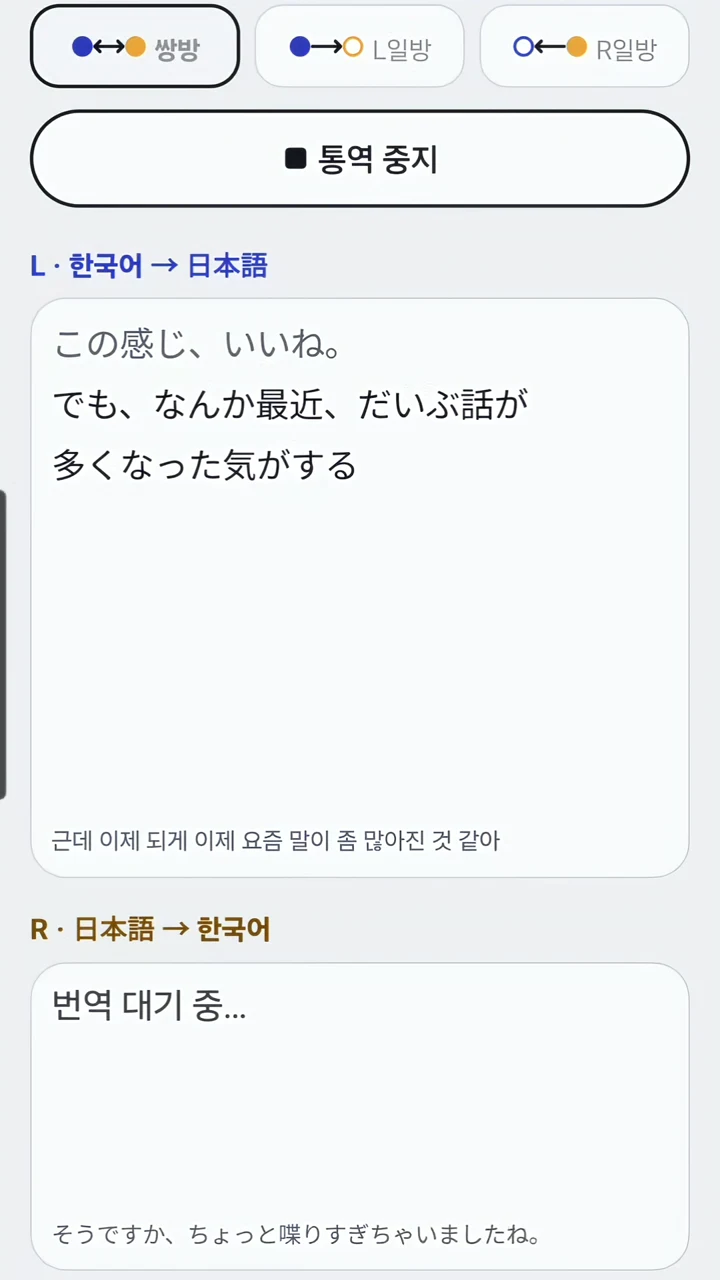
Two people. Two channels.
Separate microphone audio into left and right channels to distinguish the speakers.
Choose two-way or one-way translation for your conversation.
Read the translation alongside the original and check important details.
A compatible two-channel USB receiver and two microphones are required. Set the receiver to stereo mode so the two microphones use separate left and right channels. The app cannot be used with only the phone’s built-in microphone.
Internet access and microphone permission are required. Translation accuracy and display time vary with noise, pronunciation, language and connection quality.
Microphones for Malli Interpreter
This page participates in Coupang Partners, and we receive a commission from qualifying purchases.
The setup includes two transmitters (TX × 2), one for each person, and a USB-C receiver (RX). Here, TX2 means two transmitters, not a model name.
The Coupang button links to the LARK M2S USB-C product. At the Hollyland store, choose an option with two transmitters and a USB-C receiver, such as Duo with USB-C Plug. Set the receiver to stereo in LarkSound. Check the included items and your phone’s USB-C compatibility before purchase.
View at the Hollyland store ↗View LARK M2S TX×2 on Coupang ↗
Check shipping destinations, stock and prices with the seller.
The app supports the 18 languages below. The demo videos on this page show Korean–English and Korean–Japanese conversations. This introduction is available in Korean, English and Japanese.
Sign-in and a valid pass are required. Check actual prices and conditions in the app. Malli Interpreter and Malli Subtitles share a balance under the same account; simultaneous usage time is added together and deducted.
Usage time runs from tapping Start until tapping Stop, including silence and translation waiting time. Using two channels in the same app does not double the time deducted.
Obtain the participants’ consent. Selected audio and transcription/translation text are sent to external processing services to provide the service. Avoid sensitive information and read the privacy policy.
Check important details against the original. Translation does not replace professional judgment.